Thursday, May 16, 2013

An Online Resource You Don’t Want to Miss: The Matt Cutts Short Cutts

It’s hard to believe that this topic has never been discussed on Search Engine Journal, but it looks as though one of my favorite resources, The Short Cutts, managed to miss this blog. It has been the subject of discussion for many SEOs since day one, but
it hasn’t taken long to realize that many businesses and individuals are still in the dark about this new resource. If you haven’t heard of the tool—don’t sweat it. This online resource has only been around since March of this year, so many are still getting used to how it works. It takes less than 2 minutes to master because it focuses on being “easy.” It’s very, very easy.

Why The Short Cutts Matters

The Short Cutts works as somewhat of an online directory of videos created by the head of the Google Webspam Team himself, Matt Cutts. The website is by popular online marketing company Click Consult who saw a need to organize these videos. It was becoming clear that the very helpful videos created by Cutts were beginning to get jumbled because there were so many. Since 2009, Cutts has created over 500 videos.
To give you a little bit of background information about these videos: Cutts typically takes Google user and webmaster questions on anything ranging from SEO to web design and development to Google penalties, etc. The videos are typically only 2-3 minutes long and feature Cutts giving his best answer to the question. Despite how vague he may seem to be at times with his answers, everyone knows that hearing from the man in charge is information work noting. With this notion in mind, The Short Cutts was created.

How The Short Cutts Works

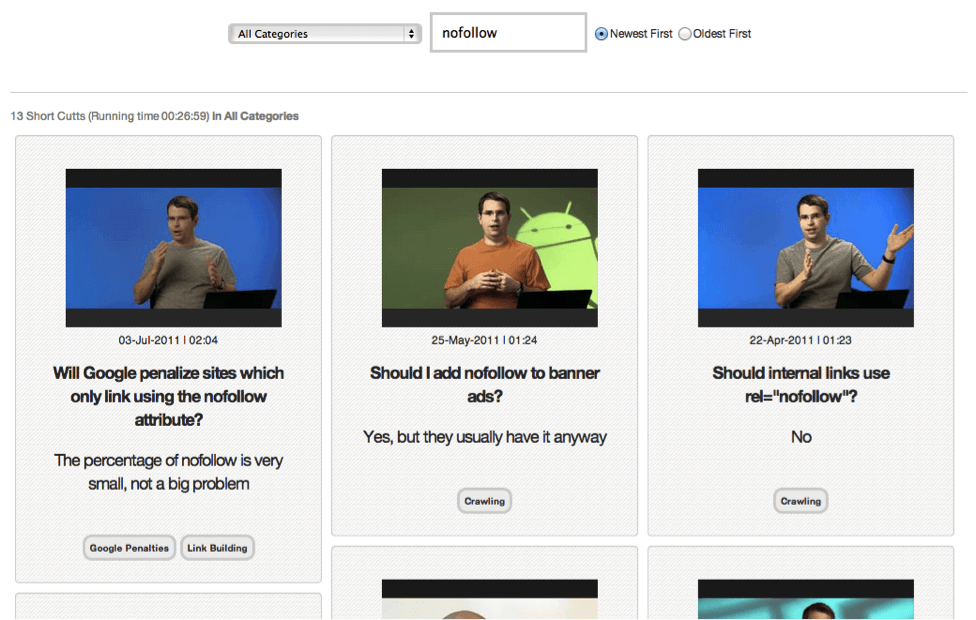
To be honest, you can probably figure out how to use the site just by looking at the page for 5 seconds, but here is a breakdown of the four different components (and a screenshot) for a little Tuesday afternoon reading:
  1. Search an SEO Question. As with any directory, you have a search bar where you will want to type in any SEO question that you have. If Cutts has created a video about anything similar, it (or they) will pop up on the screen in a grid-like format. You can sort whether you want to see the newest or the oldest videos first.
  2. Choose a Category. You can decide which category you want to search in to find a video. You can search all categories (which is what I usually do), but if it’s something general you might want to narrow it down. A few of the categories available include Link Building, SERPs, Google Updates, and even Matt Cutts Trivia.
  3. The Video. As you likely assumed, one part of the results is going to be the actual video, which you can click and watch right there on the same page.
  4. Text for the Video. The second part of your results is going to be the question followed by a very short answer. In some cases, the answer will just be a simple yes or no. It’s the best way for you to get what you need without having to watch the video (sometimes even 2 minutes is longer than you need!)
Below is a screenshot I took that illustrates all three parts of the site. As you can see, I typed in the search query “nofollow links” and sorted by newest first (of course feel free to be more specific, but something general will yield a lot of example results):
 sej 1
As you can see, I decided to search under “All Categories.” If I wanted to change my mind, I could click the one of the categories shown under the question and then sort by that particular category. In the example above, the first video is a part of two different categories—Google Penalties and Link Building.
You can find this directory at TheShortCutts.com. Scroll down just a little bit (past the cartoon of Cutts) and you can get started searching. Let us know what you think!
Photo Credit: TheShortCutts.com

A Beginner’s Guide to Unsuccessful Link Building: SEO

Author’s note: This is just a heads up that I have decided to exclude both the outreach process and content generation from this article for two main reasons. Firstly, they are both huge topics which are covered in far more depth, and detail, elsewhere than I could ever hope to do. Secondly, I’m approaching this topic with the assumption that you are already getting
content published and are building relationships with bloggers etc.
So you’ve built as many links as it is humanly possible to do. All the links have good anchor text, are well positioned and are placed on decent sites. Job well done.
As you head to the office the next day you anticipate a fanfare of trumpets, lavish gifts and perhaps even a throne. All because web traffic has quadrupled overnight, domain authority has hit a record high and sales are through the roof.
In reality though, you are sent crashing back down to Earth. Traffic continues to plod along as usual, completely indifferent to your efforts, whilst the unchanged domain authority and sales figures, merely mock the hope that is slowly fading from your eyes.
Alas my friend, that is as good a sign as any that your link building strategy needs some work. It could just be a bit of tweaking or it could be a full blown overhaul (fingers crossed for the former).
Have no fear though, because below are 11 reasons why your link building isn’t working and a few tips on how to stop it from…well…not working!
All you need is a little patience
In the world of SEO it can sometimes take a little while for things to take effect, so before doing anything rash I recommend patience. There isn’t much you can do to speed it up anyway – after all Google doesn’t really like people telling them what to do.
Your competitors are making you suck
If you need a scapegoat for the poor performance of your links look no further than your competitor. Granted that’s probably not the right attitude, but the excuse still stands…kind of.
dillbert comic
If your link building strategy isn’t going as planned then it could just be down to your pesky competitor’s strategy being better. If that’s the case then be prepared to out think, or out spend (not by buying links of course), in order to get a foot up.
Occam’s razor
Often the simplest, and most obvious, theory is the correct one. It is easy to overlook simple mistakes that are having a negative effect on your link building strategy. This is why, once you have a guest post, infographic or whatever piece of content you’ve used published, it is always worth going back to the site to have a look. This way you rule out any silly mistakes like typos in the url, anchor text or even no link at all.
Panda got your tongue?
From time to time you’ll find that your rankings may drop or your links may lose value for no obvious reason. This could be down to a number of reasons, but one of the first things you could check for is any algorithmic updates. These usually aren’t too difficult to find out about although there are rumours that Google will no longer broadcast or confirm their algorithmic updates. Once found, you will hopefully be able to identify the reasons for the recent drop in rankings etc.
panda
Your links aren’t as good as you thought
Now I’m not in the counsels of the great at Google, which is why I don’t profess to know how their algorithm works. However, if you were under the impression that you had authoritative sites linking to you but see no improvements in rankings, domain authority etc. It may be time to rethink where you’re trying to get links from/placing links.
Be original
If your link building campaign is based on using duplicate, or spun, content odds are you’re getting links from low quality, half spammy, sites which may, at least partially, explain poor results.
Onsite issues
Your link building campaign might not suck just because of your links. It is possible that there are other factors at work on your site that are damaging your offsite efforts. For starters check Webmaster Tools to see if Google have sent you any messages or issued any warnings. I’d also suggest running Screaming Frog to see if there are any broken links or site errors that could be affecting your link building. After all if you’ve been building loads of links to a page that has a 404, then it’s no wonder that you aren’t getting much joy.
Irrelevant site or content
As a general rule getting a link on a site that has little or no relevance isn’t particularly useful to a link builder. Although it will probably still pass link authority it is unlikely to help in achieving other aims such as increasing web traffic and conversions. Obviously if a really high profile site offers you a link then don’t turn it down, but be wary of having too many irrelevant sites pointing to yours.
Co-citation
This is a relatively new concept in SEO, but the esteemed Rand Fishkin boldly predicted that co-citation’s present influence – which is relatively small – will increase in the next few years. For those who don’t know what co-citation is I’ll explain it very briefly. In SEO, co-citation refers to the effect the content surrounding a link/keyword/brand has on SERPs. For example if Company A is a bakery and they keep getting mentioned/linked to in articles about cakes in London etc, then it may not be a surprise to see Company A sneak up the rankings for those, and other related, search terms. Why? Because Google has picked up that Company A is commonly associated with cakes etc and therefore believes it is a relevant result to show up for people using the appropriate search terms.
Interlink your content
It is important to try to interlink your content/website. For example if I’m writing an article on Site A and I remember that a few months ago I wrote an article that covers something relevant on Site B. Then it’s best practice to include a link from A to B so the link authority passes from one to the other; all whilst providing a legitimate link for users. As with most SEO tactics interlinking, or horizontal linking, is open to abuse and manipulation; so don’t go crazy and link to every site you’ve ever heard of in a 300 word post about apples.
DA isn’t the be all and end all
Link builders beware of domain authority. Although it is a great indicator of how Google sees a site’s authority it should be viewed with caution when it comes to link building. Mainly because it doesn’t take a site’s traffic, social metrics and user interaction into account. But just because SEOMoz doesn’t, it doesn’t mean you can’t – after all you can see, and qualify, things that no crawler can. Or if you don’t want to do it Inkybee is a relatively new tool that helps link builders to qualify a large number of websites at a time – think Buzzstream on steroids.
Anything to add?
Do you have anything to add? Think I’ve missed something out? Feel free to jump in with your two cents worth; I’d be interested to hear everyone’s thoughts…

11 Unique Ways to Boost Your Social Sharing with Buffer


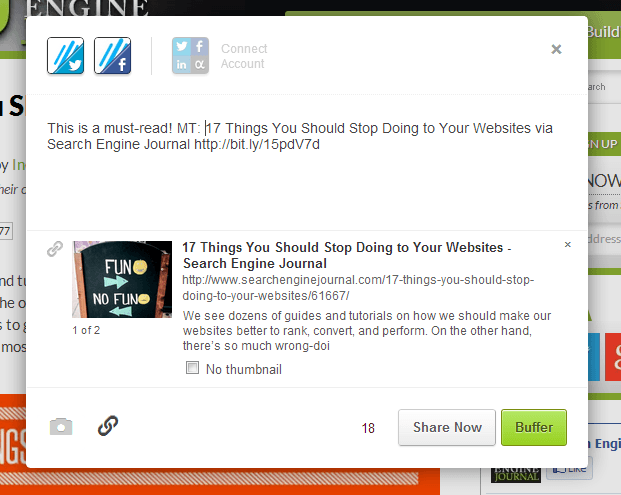
buffer-sejWhen it comes to sharing on social media sites, you can be free from the real-time grind of sending as you type. There’s no need to do all your social media posting while sitting at a screen, thanks to a number of apps that do the job for you.
One of the best is Buffer, a social sharing scheduler that works with Twitter, Facebook, and LinkedIn. Buffer builds a queue of your content and sends it to your connected profiles throughout the day, whenever you deem best. You can set your own schedule (or let Buffer do it for you) and follow-up later with Buffer’s suite of analytics built directly into your dashboard. The service saves time, energy, and sanity in trying to keep up with social media’s constant content creation. The service is free, up to two accounts, and there are paid plans for those seeking more profiles and more features.
Looking for inspiration for effective Buffer uses? Here are 11 ways
Buffer can boost your social sharing.
1. Find your perfect Tweeting schedule and sync with Buffer
Websites like Tweriod and SocialBro can analyze your Tweeting and come up with a schedule that is ideal for optimizing your Tweet times so that you’re sending when your audience is listening. Buffer connects automatically with these sites so that your Buffer send schedule matches your Holy Grail of posting.
2. Get Buffer in your browser and schedule posts from anywhere
The Buffer browser extension for Chrome, Firefox, and Safari lets you clip a web page, photo, or text while browsing. No more copy and paste. Lots more efficiency, as you never have to leave the page to share what you’ve found.
3. Buffer straight from your favorite RSS reader
Clip your favorite stories as you read them thanks to Buffer’s compatibility with the leading RSS readers. Check out this post by Buffer co-founder Leo Widrich for five Google Reader alternatives—including Feedly and Reeder—that Buffer has covered. And if you’re into Google Reader until the bitter end, there’s support for it, too.
4. Put Buffer and IFTTT to work for you
Want to schedule a tweet each time it rains? Want to broadcast each of your Evernote shares onto your Facebook page? Tap into the power of IFTTT and Buffer to make it happen. IFTTT is a free service that lets you make connections with apps and sites based on a conditional statement—if this, then that. For example, if it rains, put a Tweet in my Buffer. If I share publicly on Evernote, have Buffer add it to my Facebook schedule. There is a section on the IFTTT site for user-created examples to get your creativity juices flowing.
5. Buffer with your email
If you’re struck by a moment of inspiration and email is all you have near, send your post to your Buffer email address—message in the subject line, link in the email body—and Buffer will add it to your queue. Power users can even attach commands to specify which accounts to buffer and whether or not to post right away.
6. Clip, create, and buffer from your phone
Buffer provides native apps for iPhone and Android devices so you can take advantage of the service wherever you are. The apps help connect popular services like mail, Flipboard, and Pocket to turn your phone into a super sharer.
7. ReTweet when you want to
Buffer works right within Twitter so you can snag your favorite Tweets from your feed and schedule a ReTweet for later. It’s ideal for those who log on only a few times each day and tend to clog their Twitter timeline with RTs when they do.
8. Share your Facebook favorites on your own time
Like its Twitter integration, Buffer also lets you queue your Facebook finds to post when you see fit. Share to your own timeline or your Facebook page, as Buffer supports both.
9. Track stats in your Buffer dashboard
Find out how many clicks, likes, ReTweets, and shares your content got with Buffer’s built-in analytics. The stats give you all you need to know and nothing more, delivered in a clear and concise way inside your dashboard. The best content you share receives a “Top” badge, which is good incentive to keep Tweeting and Facebooking.
10. Buffer your blog posts through WordPress
Each time you post through your WordPress blog, add your writing to your Buffer queue with the Buffer WordPress plugin. You control which profiles get the posts, and the plugin grabs media and more to optimize each post for each social network.
11. Increase shares on your site with the Buffer button
Along with the standard Twitter, Facebook, Google+, and other share buttons found on blog posts, the Buffer button lets readers share content right away or on a schedule with just two clicks. To make life easy on the blogger, the Buffer team developed the Digg Digg WordPress plugin, which adds a menu bar of share buttons, including Twitter, Facebook, Google+, and Buffer. To see it live on a website, look to the left of any Search Engine Journal post.
Conclusion
Buffer’s social scheduling app can be lifesaver for those feeling the crush of social media responsibilities. With a myriad of connected tools and services and an easy-to-use interface, Buffer has become my go-to tool for managing Twitter and Facebook posting. If you’re looking to improve your experience with social media, this is the tool for you.

Friday, March 22, 2013

Apple blocks ad-injecting Mac trojan, Yontoo

Yontoo trojan throws extra ads into Web pagesA day after Russian anti-virus firm Doctor Web highlighted an adware Mac trojan called "Yontoo," Apple has moved to block it. Confirmed by Intego, Apple has updated the definitions included in OS X's Xprotect.plist in order to detect the adware, meaning users don't need to run anything special in order to be protected.
"In testing, it appears this detection is very specific and potentially location-dependent," wrote Intego. "This extra specificity is likely there so as to catch only the surreptitious installations of this file."

As we wrote on Thursday, the Yontoo adware socially engineers users into installing it as a browser plugin. Once it's installed into Safari, Firefox, and Chrome, the plugin injects advertising into the websites you're visiting—including those that don't even normally show ads.
The plugin poses a risk not just because it's annoying to see third-party ads where they don't belong, but because those behind the trojan could inject other malicious code. (The same trojan exists for PC users as well.) But now that Apple has added Yontoo to the built-in malware protections in OS X, it's a lot less likely that Mac users will end up accidentally installing it.

Source:http://www.arstechnica.com

Wednesday, March 13, 2013

How to Download Entire Mediafire Folder Without Premium Account

How to Download Entire Mediafire Folder Without Premium Account title=
How to Download Entire Mediafire Folder Without Premium Account ?
Hi all user, sometime you just find a cool MediaFire folder that contains your favorite movie, games or software, bunch of PDF's or whatever you want, but you actually don't want to download all files one by one because you sometime you find that it's a time consuming and annoying process isn't it? So today we want to share a better way to download entire folder from mediafire without a premium account, so lets get started.

Things you'll need :

First of all download Jdownloader
How to use :
First of all you will have to download jDownloader. After that do the following :

Try it : You can use this trick for downloading Certified Ethical Hacker v7 Instructor Slides.

Tip : At the bottom you can change the number of files that will be able to be downloaded at the same time!

Note : Your files will be saved at \JDownloader\downloads
Enjoy.......

Friday, March 8, 2013

Ways To Increase Adf.Ly Earnings and Make Quick Money Online

Welcome to Adf.ly Basics.
If you are new to Adf.ly or just need some tips in order to help boost your Adf.ly earnings, you have come to the right place.   Adf.ly is a link shortening service similar to tinyurl.com which shortens a link such as http://news.google.com/nwshp?hl=en&tab=wn 
This service not only makes it easier for you to post your links, but also pays you for everyone that clicks on it.  Currently Adf.ly pays up to $.050 to $4.00 for 1000 clicks of your link.

You maybe thinking "$.050 that's only pennies", or "how can I ever get 1000 clicks on my links."  I'll address those 2 questions below.

Earning pennies isn't much money?
My payment from Adf.ly last month.   Pennies can really add up fast.

Update: Latest payment:
image

1000 clicks?  Sounds impossible!
The main concern with most everyone using Adf.ly is TRAFFIC, and how to get more traffic to click on their links.  This is always a complicated question to answer because as everyone knows, it's not easy to generate your own traffic without a lot of long, hard work.   BUT there are ways where you can USE traffic from other sources.  Another thing to consider is that Adf.ly pays you for up to 5 visits from the SAME PERSON.  This means that if you have 5 links and the person clicks on all of them, you will get paid for all 5 visits!  So, basically, you will not need 1000 people to visit your links as long as you have multiple links for your visitor to click, thus you will need less people to reach that 1000 clicks.  I will list below, several ways to use traffic from other sources to help increase clicks to your Adf.ly links. 

Youtube traffic
This is probably the most well-known method to generate Adf.ly traffic.  The easiest method would be to find popular videos that are receiving a lot of views on Youtube.  Download the videos to your computer using one of the many free Youtube downloading sites or software.  Re-upload the videos to your own Youtube account and title it similarly, or as close as possible to the original up loaders title.  This method will get you views for your links posted below the clips, but I will go one step further to help you get the maximum amount of views.

Step 1.  Choose 3-4 videos in a certain genre (example: Breaking News). Download these videos and then re-upload them to your Youtube account, BUT, set only one of those videos to "public", the others set them to "unlisted".  The reason for this is that if ALL of your videos are "public", all one has to do is to check out your channel page and they can watch all of your videos without having to click on any Adf.ly links.
Step 2.  Create Adf.ly links to all of the "unlisted" videos.
Step 3.  Under the "public" video, post a caption like this "Breaking News story #2 etc... and then add your Adf.ly links below the clip.  If your "public" video is popular, you will definitely get views on your other videos, which means you will be getting Adf.ly clicks.
Step 4.  Rinse and repeat steps 1-3 using different videos from different genre (comedy, fails, songs etc)
Step 5.  Now go to your channel page.  On the left column you will be able to add all of your Adf.ly links and descriptions. (use the old channel view, the new one sucks IMO)

If you decide to go the Youtube route, don't just stop with 3-4 videos (one genre).  Try and find as many different genre videos to list.  If you can generate just 100 clicks from your 3-4 "News" videos a day, you can generate 1000 clicks from 10 different other genres, right?

Forum traffic
Another easy method getting traffic from other sources is to post your links on forums, news boards etc.  This is pretty self-explanatory and doesn't need much explaining.

Craigslist traffic
This is probably the FASTEST way to get clicks and traffic.  Now, getting Craigslist traffic is not as easy as just posting your links in ads.  Craigslist has banned the use of Adf.ly in posts.  However, all is not lost because I will show you an easy way to utilize Craigslist and it's millions of views per day.  Popular items can earn 1000's of hits a day during the life of the ad.   My method has worked extremely well and is only limited to the amount of ads you place.  It doesn't take a genius to figure out that if one post can bring you 1000 hits a day then 10 posts can bring you 10,000 hits a day.  Join me below and learn my method of using Craigslist traffic to boost your  Adfly income.

Of course I do not condone posting fake ads on Craigslist, and this is being shown only as an example of how to generate Craigslist traffic to your links.  That being said...

*Note: The tips listed above are just basic techniques that you can use to increase clicks.  Read below for information on how you can learn the advanced techniques that help me earn $100's per month!

An additional $2.60/1000 views?
While posting pictures on tinypic.com etc is a good way to host your pictures, we have been using picture hosts that PAY you every time someone views your images.  ImageTwist and Imageporter which pays up to $2.60 for every 1000 clicks of your picture.  Of course this works hand-in-hand with Adf.ly on Craigslist, coupling both of these services together will earning you up to $9.20 per 1000 views.  The only difference, is to replace the uploading of your pictures to tinypic.com to ImageTwist and ImagePorter instead.  If you do decide to use these sites, please use my ImageTwist referral link here and ImagePorter referral link here.  Join using my referral links and I will show you advanced techniques on how to earn maximum profits.
UPDATE:
Imagetwist and Imageporter have stopped paying for non-adult images.  If you do post adult images, these sites still do pay very well.  For non-adult images, I have switched to Imagehyper and found the results just as satisfactory.  They pay up to $2.70 per 1000 views of your images.


JOIN ME AND DOUBLE YOUR INCOME INSTANTLY!
Join me in Adfoc.us and effectively double your income instantly!  This company works on the same concept as Adf.ly, so it will be familiar to you and your visitors.  BUT, it pays up to $5.40 for 1000 views, that's more than Adf.ly!   See my payment proof:

image deleted


UPDATE:
Adfoc.us has stopped paying, (they owe me over $150).  For this reason I have stopped recommending this site and have started using Linkbucks.   For the people that have joined Adfoc.us using my referral ID, .  The same offer stands for anyone that joins Linkbucks using my referral ID.  Linkbucks does not pay as much as Adfoc.us but at least they have been around the longest and are very reliable.  They also pay 20%, 10% and 2% on your 1st-3rd level referrals respectively. The same techniques will work with Linkbucks and you will be able to add to your Adf.ly income if you follow my simple guides.  Sign up for Linkbucks here.